About Me

My photo
Rohit is an investor, startup advisor and an Application Modernization Scale Specialist working at Google.

Saturday, July 28, 2018

Migrating WebLogic workloads to the cloud

# CaaS

0. Containerize the app - PAS ... zero changes to the app - research - Weblogic standalone. Single inbound route. Stateful workload => volume services on PCF. Docker images.
1. Containerize the app - PKS ... zero changes to the app - Use existing Helm charts or operators to run on PKS - Weblogic clustered https://github.com/oracle/weblogic-kubernetes-operator/blob/master/site/design.md

#PaaS

2. Using a buildpack - Weblogic buildpack https://github.com/pivotal-cf/weblogic-buildpack
3. Using a buildpack - TomEE buildpack - Runs JavaEE. YMMW if there is a lot of ORCL specific deployment descriptors and API usage
4. Using the Java buildpack - Java Buildpack - Bootify the app and replace all EE framework usage with corresponding Spring components and frameworks - some changes - very well understood - and recipes exist for ALL mods EJB Migration
5. Using the Java buildpack - Package up the app as a fat app in WebLogic and then run it simply as a jar with the JBP. - experimental but could yield replatforming with 0 changes. same restrictions as PAS apply.

# FaaS

- Does not apply

#VM 

7. BOSH to deploy Weblogic as a release. BOSH release for weblogic
8. Ansible, chef recipes ...

# Bare Metal

9. Run as-is today on servers with NO virtualization.

GKE-on prem, Azure on-prem , AWS on-prem

All the major clouds are coming to a datacenter near you*. You can get Google, or Azure megascale in your own house datacenter. You can start taking advantage of the cloud platforms to improve and shift your workloads to the cloud and get the benefits of being cloud native. The cloud will be a force function for innovation and change in your organizations allowing you to finally throw away the yolk of agilefall or wagile or DAD or Scrum whatever has kept you behind. Your software can eat the world. You will no longer be threatened by the millennial's of Silicon Valley. 

wait a minute ... there is something missing here !! ... 

Humans. Where is the human cloud ? Where is the Cloud Native Transformation as a service. Where is the Platform as a Product Service. Where is the Domain Driven Design as a Service. Where is the SRE as a service. Where is the Outside-in product thinking as a service. Where is the  Training as a service. Where is the Incident Management as a Service. Where is the Busting Canonical Domain Model as a service. Where is decomposing monoliths as a service. Where is the Refactoring databases as a service. Where is Decomposing UIs as a service ? Where is the Outcomes as a service ? Where is the Human as a Service. 

Remember that the human aspect of the cloud is the biggest force function enabler that will enforce the razor focus on outcomes rather than technology envy. As I sit here reflecting on all the technology choices that are passing through > microservices, serverless, kubernetes, cloud foundry, the million choices from CNCF,  please remember the cloud revolution needs to be customized to your needs and not the other way around. 

Pick and chose the boring technology choices available that get the job done and allow you to reach your objectives and key results. Do not forget that the ultimate goal is increased frequency software releases, reduced change failure rate, reduced lead and cycle time to iterate fast and converge on the right outcome. 


So yeah please install PCF, gke, aws, openstack, vmware , azure or whatever but remember software is a means to the end and it is the END that has always to be kept in mind unless your core business is the business of software itself. 

* I have money on AWS-on-prem being announced this ReInvent. 

Day 2 Application Operations

What are the set of practices you need to inculcate and internalize to keep your app alive in production ? Here is a checklist that can help ...

1/ Use spring boot actuators in production … AppManager has secret sauce integrating with actuator allowing for easier management  and visibility of your app of PCF. all your actuator endpoints

2/ When it makes sense add custom health indicators that add to the default health indicators

3/ Add spring cloud sleuth to your classpath dependencies so that you can visualize the call flow across microservices threads with zipkin in PCF Metrics http://docs.pivotal.io/pcf-metrics/1-4/using.html

4/ Plug a syslog drain to the end of the Firehose using the appropriate nozzle like https://docs.pivotal.io/partners/splunk/index.html

5/ Emit application or domain level metrics using Micrometer https://docs.spring.io/spring-boot/docs/current/reference/html/production-ready-metrics.html

6/ Starting PCF 2.2 you can configure alerting and autoscaling on any custom app metric. Custom rules for autoscaling.

7/ Use VisualVM and sister tools from the JVM to get deeper insight particularly for performance issues. Here is a good article on setting up VisualVM with an app running on Cloud Foundry. Furthermore the ability to take threaddumps and heapdumps is critical in analyzing performance issues specifically How to generate Java Application thread dump from Cloud Foundry container and How to generate and download Java Application heap dump from Cloud Foundry container and How to know if an app is responsible for high CPU in a Diego Cell and how to find it

8/ Leverage canaries to understand the quality of the app and then scale up with Blue/Green. concourse-pipeline.

9/ Create a SLI/SLO dashboard to get immediate visibility into your error budgets and uptime.


10/ Practice an outage handling event and run through debugging common scenarios like OOM, hangs, deadlocks using cf-ssh, and boot actuator endpoints. Create a program around incident response management.


Tuesday, February 13, 2018

Onboarding applications onto Pivotal Cloud Foundry

We often talk about reducing the barrier of entry for developers onto a new platform. Remember your platform - PCF is a product. One of the core advantages of PCF is how it catalyzes developer productivity. This productivity often comes from having an opinionated prescriptive approach to developing apps. With the appropriate gaurdrails and productivity practices in play enterprises can truly harness the power of the platform. In this blog post I put forth the developer workflow for developing and onboarding apps at the highest level of abstraction.

What should be the onboarding process for an app on PCF ?

  1. App Developer logs in into the App On boarding portal.  Operators need to automate access to the PCF platform for developers in an enterprise using cf-mgmt with the following commands. 

  2. Customized version of start.spring.io for Java and .NET apps that generates a running app bound to the relevant PCF service - Redis, Rabbit, MySQL, …. Fork this spring intializr repository for customizing start.spring.io.
  3. Scaffolding: Portal generates a corresponding CI pipeline that deploys said app to dev space. Reuse spring-cloud-pipelines. Minimal refactoring to comply with basic Spring Cloud Pipelines requirements. At the end of this stage, each app will have a corresponding pipeline on Concourse. The pipelines will successfully build the apps, store the artifacts in Bintray, tag the GitHub repositories, and deploy the apps to Test, Stage, and Prod spaces in Cloud Foundry.
  4. The app generated by the start.spring.io has appropriate tie-ins into credhub and a config server for managing secrets and config respectively.
  5. Security integration with the app putting it in the right authentication/authorization flows with Pivotal SSO or custom services
  6. Iterate on app features tracking the objectives and key results of the application. 
  7. Testing: Add/organize tests to comply with Spring Cloud Pipelines recommendations. Incorporate flyway for database schema versioning and initial data loading. At the end of this stage, the pipelines will trigger unit and integration tests during the Build stage, smoke tests in the Test environment, and end-to-end tests in the Stage environment. The pipelines will also ensure backward compatibility for the database, such that you can safely roll back the backend service app, even after the database schema has been updated. Release workflow pipeline starts to promote the app into test and staging => Blue/Green deploy with tagging in artifactory. Integrate with ESB and other down stream integrations. Insert release mgmt. gate here.
  8. Contracts: Incorporate Spring Cloud Contract to define the API between the UI and service apps and auto-generate tests and stubs.At the end of this stage, the pipelines will catch breaking API changes during the Build stage and ensure backward compatibility for the API, such that you can safely roll back the backend service (producer) app, even after an API change.
  9. Pipeline to promote to prod.. This may deploy to multiple foundations. This has the capability to do a canary and dark deploys and rollback. Insert release mgmt. gate here

References:

Friday, January 26, 2018

Generating Load and chaos on Pivotal Cloud Foundry


If you wanted to generate load on the apps running on PCF and wanted some load scripts here are some repos that stress test Spring Music and other apps

https://github.com/pivotal-cf-experimental/spring-music-on-cf-benchmarking

https://github.com/xchapter7x/cf-app-attack

https://github.com/cloudfoundry/cf-acceptance-tests/tree/master/assets/dora

https://github.com/bijukunjummen/boot2-load-demo

https://github.com/cloudfoundry-incubator/pat

https://content.pivotal.io/blog/250k-containers-in-production-a-real-test-for-the-real-world

https://github.com/dsyer/spring-boot-startup-bench

https://github.com/jamlo/jmeter-bosh-release

https://github.com/chaostoolkit and https://github.com/chaostoolkit/chaostoolkit-cloud-foundry

https://github.com/ragstorooks/testrr

Chaos Loris which is chaos monkey for application instances which will exercise your applications resiliency.

Chaos Lemur which is chaos monkey for BOSH releases and jobs, so it exercises the resiliency of the platform

Generic Script to create chaos ...

apt-get install apache2-utils

# ab -n <num_requests> -c <concurrency> <addr>:<port><path>po

ab -n 1000 -c 100 http://localhost:4567/


Tuesday, January 23, 2018

Connecting to Oracle Databases from apps in Cloud Foundry

A common use case when replatforming apps is connecting to oracle databases via a user provided service instance. There are three ways these CUPs can defined as specified in the spring cloud connectors #oracle doc. There are some gotchas when defining oracle CUPs. This post provides examples of when and which form of Oracle CUPs to define ...

The connector will check for:
  1. uri using the scheme oracle
  2. jdbcUrl using the subprotocol oracle in the JDBC URL
  3. oracleUri, oracleuri, oracleUrl, or oracleurl fields in credentials
Any of the three approaches will work ...  however;


- If you are using oracle subprotocol , then the CUPs has to be a uri. 

- If your DB url contains the ldap:// prefix before the host name in the URL then use the jdbcUrl credentials property instead of url. 


cf create-user-provided-service catalog-db -p '{"jdbcUrl":"jdbc:oracle:thin:TOMHANKS/<pwd>$2011@(DESCRIPTION=(ADDRESS_LIST=(LOAD_BALANCE=on)(FAILOVER=on)(ADDRESS=(PROTOCOL=TCP)(HOST=espndb.net)(PORT=1555))(ADDRESS=(PROTOCOL=TCP)(HOST=espndb.net)(PORT=1555))(ADDRESS=(PROTOCOL=TCP)(HOST=espndb.net)(PORT=1555)))(CONNECT_DATA=(SERVICE_NAME=cd_app)(FAILOVER_MODE=(TYPE=select)(METHOD=basic)(RETRIES=180)(DELAY=5))))"}'


cf cups ulrDataSource -p “dbURL” oracle://ulr_wsph:facebook123#@rwev10exp.abc.facebook.com:1576/e_facebooklog_rgwd.nbc.us


The Spring cloud connectors library provides ORACLE connectors that automatically wire up your ORCL cups to your Spring datasource bean
http://cloud.spring.io/spring-cloud-connectors/spring-cloud-connectors.html#_extending_spring_cloud_connectors


Significant contributions to this post by Anwar Chirakkattil , Oleg Iavorskyi and Brad Starkenberg

Thursday, November 2, 2017

A View on Chargeback and Billing with Pivotal Cloud Foundry

We see that when enterprises install a Platform like Pivotal Cloud Foundry one of the primary motivations is to reduce the time to market. Enterprises want to fulfill their customer needs and leverage the platform and app dial tone provided by Pivotal Cloud Foundry to enable developers to push apps faster than before and rapidly experiment. There is however a real temptation to institute the same practices of yore to manage and onboard apps to the platform. Establish fine grained chargeback models that penalize innovation and count every nickel and dime when it comes to memory or network traffic or app or service instances on the PaaS. This defeats the purpose of PCF to encourage creativity and rapid genesis of ideas to production.

# So how does one think of chargeback in a new world. How do we get the profusion of apps on the platform and gain optics into cost and charge reasonably ?

Keep it simple. Observe, orient and act.

First and foremost remember PCF is a  PRODUCT and when you’re launching a new product whether it’s ice cream cones or a PaaS, if you don’t price it right based upon the market conditions, then no customers will come and you’ll be left with a bunch of melted ice cream or an empty PaaS. If  the market is undefined i.e. the platform engineers are not already doing chargeback for other infrastructure, any attempt to price PCF now would be a shot in the dark and more likely to over/under estimate the value of the product than to be hit the mark. And over/under pricing it both come with big risks in the both the short and long term. Put in place all the facility you need to understand consumption, do market research on what people are willing to pay.  Customers don’t even know the value yet until they start using it!.


Promote usage internally first, by observing usage amount/usage patterns/costs with earlier adopters before start charging other teams, otherwise adoption rate by dev teams may be low if the platform costs too much.

Build a model based on quotas as a starting point.  Show what the costs are for their entitlement NOT what they are actually using i.e. similar to the AWS model. Organization Quotas force accountability and make it way easier to do capacity planning. Pretty easy to get started.  There’s a cost to buying a lot and the Platform Engineers should not care what the app teams do with that lot.  If the app teams decide to deploy nothing platform engineers have still reserved whatever is in your quota.  Doesn’t mean that platform team can’t over subscribe resources.

# Resources


# Credits

PCFs Team - Caleb, Parker, Luciano, Zac, Clayton, David, Ian and Eamon 

Friday, October 13, 2017

Pushing WebSphere Application Sever Applications to Cloud Foundry with Open Liberty

Thanks to a  friendly nudge and significant contributions from Michael Wright, I have had the opportunity to reacquaint myself with an old friend - the WebSphere Liberty Profile Buildpack. In case you missed it, in a bold move IBM open sourced the WebSphere Liberty Profile their lightweight application server.  Open Liberty as it is called now is an excellent landing spot for ALL current WebSphere Application Server classic apps. 

To get them running with the least amount of changes WebSphere apps should typically be pushed with the WebSphere Liberty Profile Buildpack. The Liberty buildpack has myriad ways of configuring it with lots of environment variables to control the set of features and WebSphere server configuration and so on ... Here are some best practices to follow a repeatable and simple process of migrating your apps using Open Liberty to Cloud Foundry: 

1. It’s OK to develop on STS or Eclipse, but don’t rely on Eclipse to package the application inside the server configuration.

2. Develop your application with Open Liberty's maven plugin. If you have an existing project convert it to Open Liberty by cloning and copying the build pom.xml from one of the guides.  This is a very similar to a spring boot like experience for JavaEE/EE4J.  An alternate way of developing is to configure the server.xml for your server and then keep copying the app to the dropins folder. 

3. After your application runs locally package a Liberty server with your application in the dropins folder and the right server configuration in the usr directory. This is akin to packaging a fat jar for your WebSphere app. Creating a server package avoids the headache of configuring the buildpack with the right set of environment variables when pushing the app. 
server package defaultServer --include=usr 

4. When the application does run in Cloud Foundry play special attention to this message 2017-10-12T22:59:27.80-0400 [APP/PROC/WEB/0] OUT [AUDIT] CWWKT0016I: Web application available (default_host): http://9e1d0c1c-a318-46eb-7760-0302:8080/war-with-resource/
This informational message reveals your context-root for your application. Context root determination for an app is a multi-step evaluation based multiple files.

The context-root attribute specifies the entry point of the deployed application. The entry point of a deployed application is determined in the following precedence:
- context-root in the server.xml file
- application.xml, if an EAR application
- ibm-web-ext.xml, if a web application
- name of the application in the server.xml file, if a web application
- Directory name or the file name relative to the drop-ins directory of Liberty
My rule of the thumb is NEVER to set a context root and manage the public URL via a Cloud  Foundry route. By default the buildpack set context root for an ear file is "/".

Notes of Caution 
  1. Your application does not need to be cloud native to run on Cloud Foundry. You can push zero factor apps to CF no problem. If the application does not function correctly look under the hood by cf ssh'ing into the container and examine the final server.xml. If your EE resources are not being served or recognized by the container check your list of features and corresponding configuration in server.xml
  2. WebSphere Liberty Profile Buildpack provisions the DEV licensed WebSphere Liberty Profile runtime and NOT the Open Liberty runtime. To avoid licensing headaches you should fork the Liberty Profile Buildpack to provision the Open Liberty runtime instead of the DEV only licensed WebSphere Liberty Profile runtime.

In Closing

If you want to completely avoid the IBM apple cart, an excellent alternative is the TomEE buildpack which also runs JavaEE7 Full , Web and micro-profiles  ear, war,  fat and skinny jar apps. For more on this topic read a previous post yes-we-can.

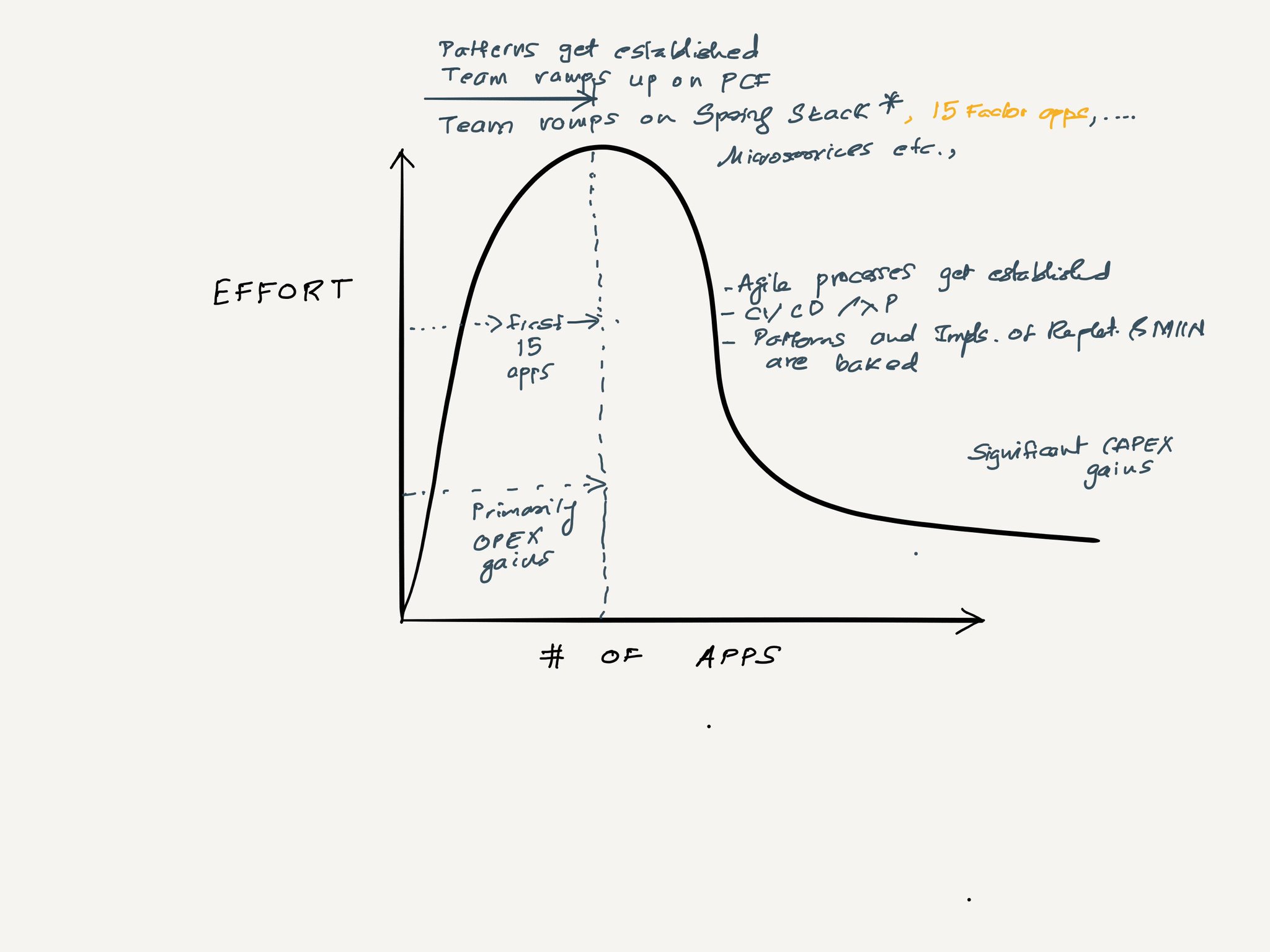
Replatforming  is just the first phase of your multi-step journey to Cloud Native.  Your ideal end-state is to make the app cloud native and therefore vendor and platform agnostic leveraging the app  dialtone based on the contracts established by the  platform API. 

The Cost Curve of Application Replatforming